

Last Updated: November 18, 2026
Introduction
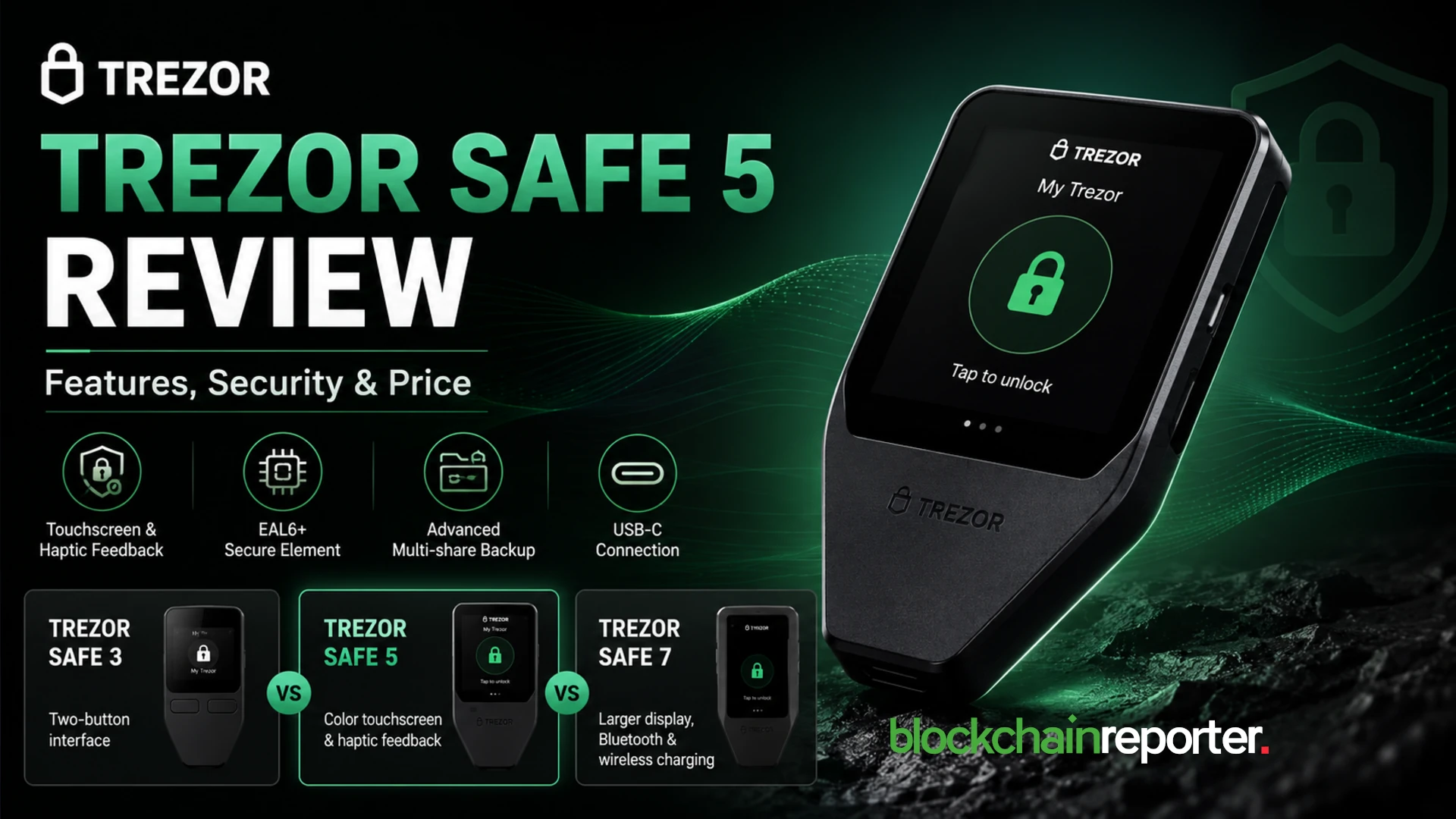
The Trezor Safe 5 is the mid-range hardware wallet from SatoshiLabs. It sits between the entry-level Trezor Safe 3 and the flagship Trezor Safe 7. It uses a color touchscreen and haptic feedback instead of the older two-button design, which makes secure storage easier to use.
This review covers what is inside the device, the 2026 firmware and security updates, how it compares with the rest of the lineup and where to buy it safely.
What Is the Trezor Safe 5?
Trezor Safe 5 is a hardware wallet. It is a physical device that keeps your private keys offline, away from computers and phones that malware or phishing can reach.
According to Trezor’s official product page, the Safe 5 has a 1.54-inch color touchscreen (240×240 pixels) with Trezor Touch haptic feedback. You can view, tap and confirm each transaction on the device itself, so you do not have to trust a computer screen alone.
The device builds on more than a decade of open-source Trezor wallets. You manage coins and tokens in the Trezor Suite app for desktop and mobile. Suite lets you send, receive, buy, sell and stake supported assets.
Security and Hardware Specs
The Safe 5 uses a certified EAL6+ Secure Element chip. You enter your PIN and passphrase on the device itself. Trezor describes this setup as its main defense against both online and offline threats. Gorilla Glass 3, a scratch-resistant glass used on many phones, protects the screen.
For backup, the Safe 5 supports standard 12-, 20- and 24-word recovery phrases. It also offers an Advanced Multi-share Backup option, which splits your recovery data across several backup cards instead of one phrase.
The device connects over USB-C and has a microSD card slot. It is small, about 66 x 40 x 8 mm, and weighs 23 grams. A 160 MHz ARM Cortex M33 processor powers it.
Firmware and Security Updates in 2026
Trezor ships regular firmware updates for the Safe 5 through Trezor Suite. Trezor’s firmware changelog lists version 2.13.0 on October 21, 2026 and version 2.13.1 on November 11, 2026 as the latest releases.
Version 2.13.1 matters for one group of buyers. In October, a user reported an extra circuit board inside a Safe 5 bought from CryptoBilis, a former Trezor reseller in Southeast Asia. Trezor later confirmed implants in three devices bought from CryptoBilis between August 20 and September 23, 2026. The implant copied the screen, including recovery words, and sent the data out over a mobile network.
Trezor says the implant did not change the firmware or the Secure Element, and no customer has reported lost funds. Firmware 2.13.1 stops the known implants from capturing data. It cannot protect a backup that was already captured, so CryptoBilis buyers are told to move funds to a new wallet with a new recovery phrase. Our report on the confirmed implants has the full findings.
Trezor Safe 5 vs. Safe 3 vs. Safe 7: How It Fits in the Lineup
Trezor sells three hardware wallet models, and Trezor’s own comparison page shows where the Safe 5 sits:
- Trezor Safe 3: the entry-level model. It has a small 0.96-inch black-and-white screen and two buttons instead of a touchscreen. It still has a Secure Element chip.
- Trezor Safe 5: adds the 1.54-inch color touchscreen and haptic feedback. Trezor pitches it as the more comfortable choice for daily use.
- Trezor Safe 7: the flagship. It has a larger 2.5-inch screen, the new TROPIC01 secure chip in a dual Secure Element design, Bluetooth, Qi2 wireless charging and IP54 dust and water resistance. The Safe 5 has none of these.
Trezor’s product FAQ frames the Safe 3 vs. Safe 5 choice around comfort. The touchscreen and haptic feedback are the upgrade, while both share the same Secure Element security. The Safe 7 is a bigger step up. It has an aluminum body instead of the Safe 5’s plastic one, and it adds wireless features the Safe 5 lacks.
Is the Trezor Safe 5 Worth Buying?
The main case for the Safe 5 is the case for any trusted hardware wallet. Your private keys never touch an internet-connected device. An exchange hack or a phishing site in your browser cannot reach funds stored on it.
Trezor also uses tamper-evident packaging and security seals. These are meant to show that no one opened the device before it reached you. That is why Trezor tells buyers to use its official store or vetted resellers, not unknown marketplace sellers.
Within the lineup, the Safe 5 makes sense if you want a touchscreen but not the Safe 7’s wireless features and premium build. If price matters most and two buttons are fine, the Safe 3 offers the same core security for less. If you want Bluetooth, wireless charging and the toughest build, the Safe 7 is the step up.
Other hardware wallets take a different approach. The Tangem card system has no screen and uses NFC cards you tap on a phone. The Safe 5 gives you a screen to check every transaction, but it is bulkier than a card.
A software wallet is a different trade-off again. Apps like Trust Wallet or 1inch Wallet are free and always on your phone. They suit small, everyday amounts, but their keys live on an internet-connected device. Hardware wallets like the Safe 5 are built for larger and long-term holdings, where offline storage is worth carrying a device.
Pricing and Where to Buy
Trezor’s store has listed the Safe 5 (Black Graphite) at a standard price of $129, with sale prices such as $103 during promotions. Prices change often, so check Trezor’s official store for the current figure. A Bitcoin-only version is also sold. The box includes a USB-C to USB-C cable, two 20-word backup cards, a start-up guide and Trezor stickers.
Supply-chain checks on hardware wallets have tightened since the Ledger implant case, prompting Trezor to shrink its authorized reseller network. By November 2026, Trezor said it had cut the network by about 80%. It now advises buyers to order directly from trezor.io. Set the device up yourself, and never use a recovery phrase that came in the box.
About the author
Max delves deep into the cryptocurrency realm, with a passion for altcoins and NFTs. Convinced of crypto's transformative potential, he envisions a decentralized financial future. Max's background in the financial sector grants him unique insights into global monetary systems. In his leisure, Max embraces the thrill of adventures and is an avid sports enthusiast, finding balance and rejuvenation away from work.
View all articles by Max Clark
Frequently Asked Questions
What's the difference between Trezor Safe 5 and Trezor Safe 3?
The Safe 5 adds a color touchscreen and haptic feedback in place of the Safe 3's two-button interface. Both include a Secure Element security chip; the difference is primarily about interface comfort, not core security architecture.
Does the Trezor Safe 5 support Bitcoin only, or other coins too?
The standard Trezor Safe 5 supports thousands of coins and tokens through the Trezor Suite app. Trezor also sells a separate Bitcoin-only variant of the same hardware for users who specifically want a single-asset-focused device.
How do I move crypto from an exchange to a Trezor Safe 5?
You connect the device, open Trezor Suite, enter your PIN, select the receive account for the asset you want to transfer, and copy the generated wallet address into your exchange's withdrawal field.
Is the Trezor Safe 5 better than keeping crypto on an exchange?
A hardware wallet like the Safe 5 keeps your private keys offline, away from the kind of remote attacks (exchange breaches, phishing) that target internet-connected accounts. The trade-off is that you become responsible for safely storing your own backup phrase, since there's no company that can reset access for you.
Where should I buy a Trezor Safe 5 to make sure it's genuine?
Trezor recommends purchasing only through its official store or officially listed resellers, since devices bought through unverified third-party channels can't be guaranteed authentic or untampered.